
Install Aegis
Install Aegis from the VS Code Marketplace. No web signup is required to start with Community.
Trust cannot be another model output.
Today, Aegis independently verifies security-sensitive software changes: what was claimed, what evidence supports it, what was authorized, and whether the resulting change actually held.
code --install-extension aegis-security.aegis-security 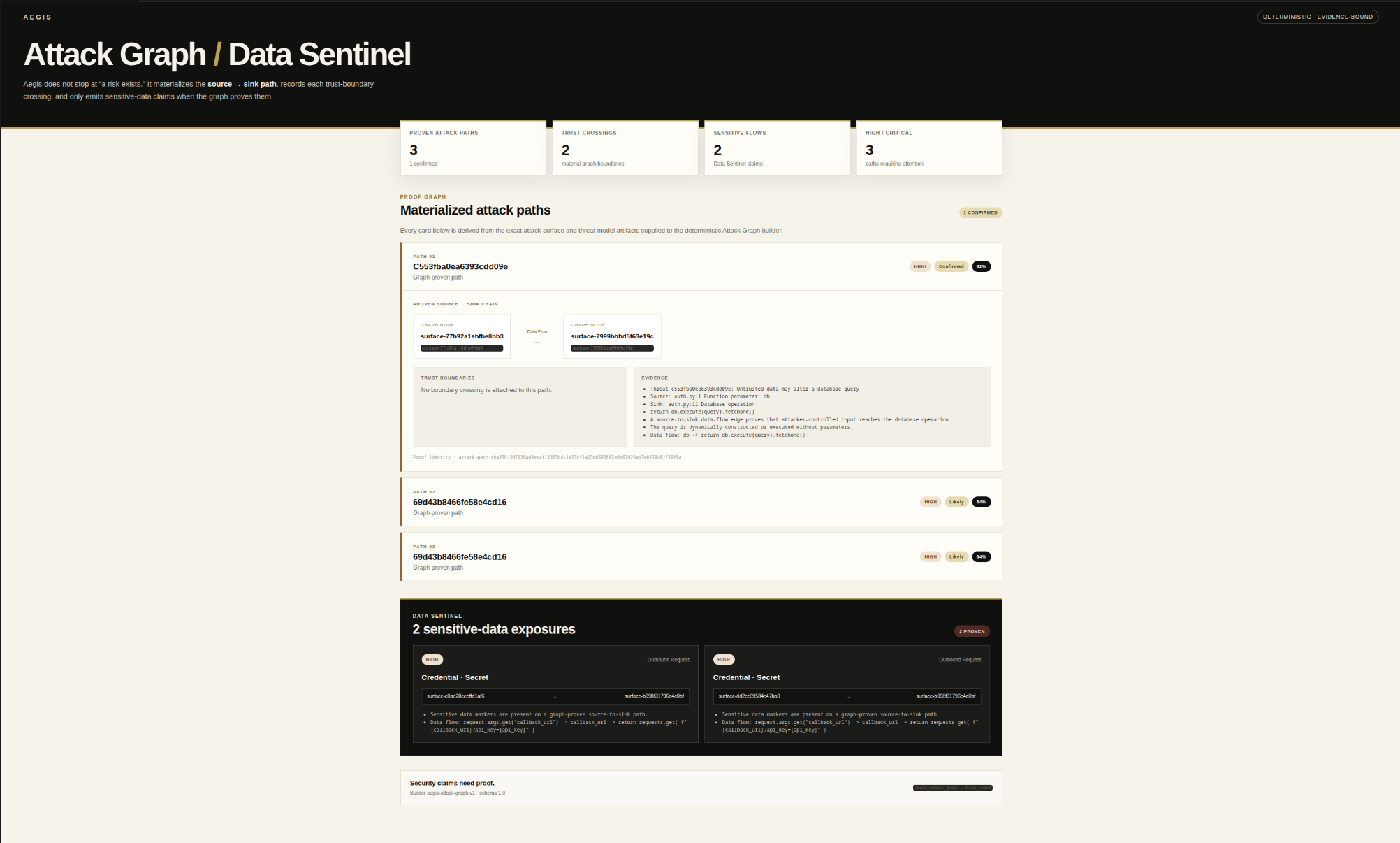
START HERE
Install the extension, open your code, and run a scan. Community works without creating a website account.
Install Aegis from the VS Code Marketplace. No web signup is required to start with Community.
Open a file, select code, and run Fast Scan. Workspace and dependency scans broaden coverage when you need them.
Aegis connects findings to evidence, attack paths, threat reasoning, and verification state so you can see why a claim should be trusted.
Paid and provider-backed analysis is optional. GitHub sign-in on this website is used only to link billing identity and paid access.
There is no separate Aegis username and password account to create. The working product stays in VS Code.
The trust problem
AI can propose changes and software can increasingly act without a human writing every line. That makes a security answer less important than the chain behind it: evidence, authorization, independent verification, and an explicit decision.
Security conclusions stay distinct from the evidence that supports them.
A proposed change does not get to certify that it solved the problem it addressed.
Uncertainty remains visible instead of being flattened into a clean-looking answer.
How Aegis works
Aegis keeps the security claim separate from the evidence used to support it. A finding does not become a verdict just because a scanner or model produced it.
Aegis Snapshot
A browser-local preview for the first thirty seconds of evaluation. Source stays in this tab. Snapshot surfaces deterministic review signals; it does not issue a security verdict or replace full Aegis verification.
Add one source file. Snapshot will map a small set of deterministic review signals locally, then hand the full-repository decision back to Aegis.
Snapshot can point at code. It cannot establish the repository-level security claim.
Lexical signals can prioritize review. Full evidence, authorization, and verification remain product work.
Need the repository, attack graph, remediation, and proof? Snapshot stops before authority begins.
Product proof
Aegis does not compress the workflow into a green badge. It keeps mapping, reasoning, remediation, verification, decision, and control inspectable as separate stages.
See the path and its evidence before deciding what deserves deeper verification.
Attack Graph / Data Sentinel materializes the source-to-sink path, trust crossings, evidence, and proven sensitive flows before Aegis asks you to trust a security conclusion.
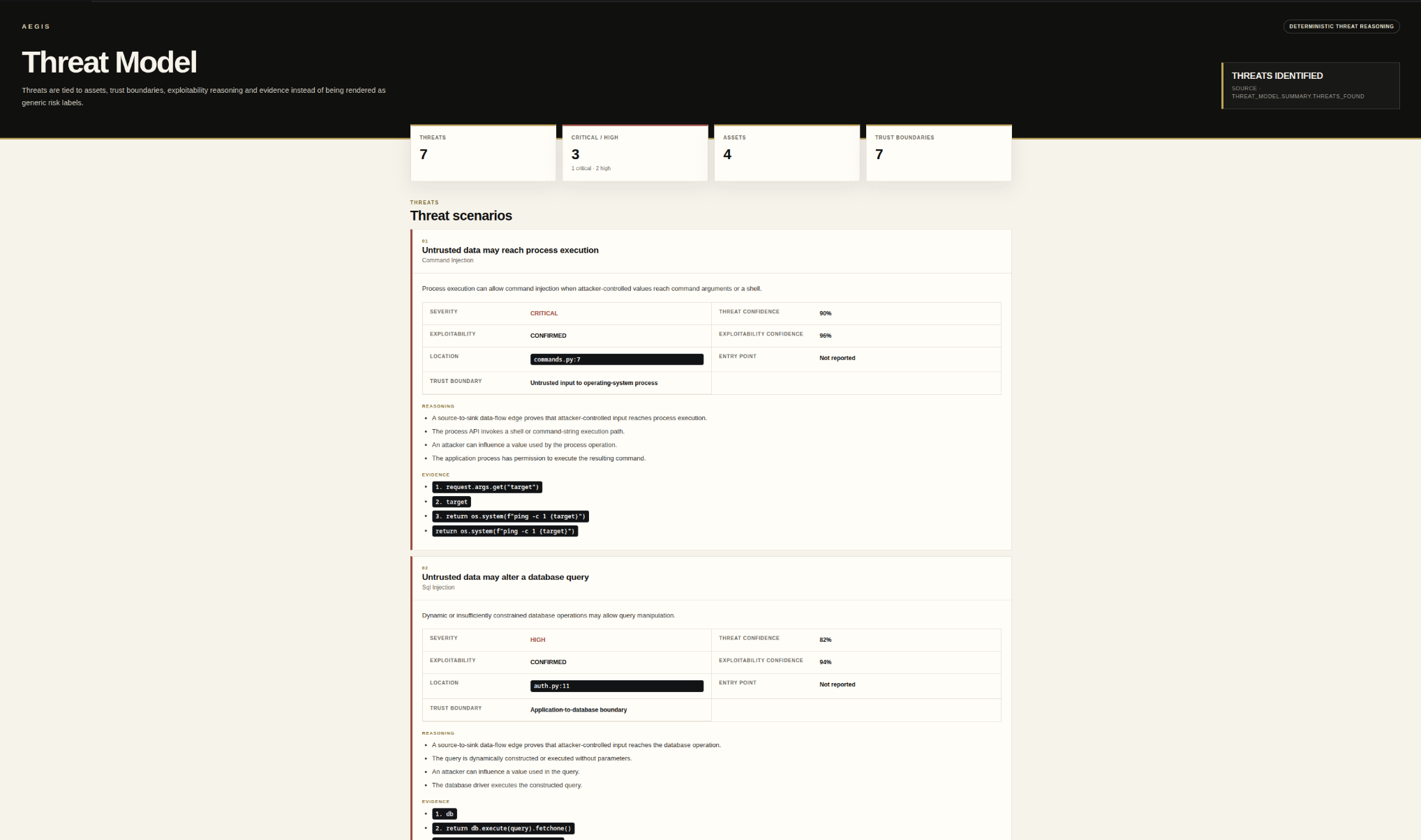
Threat Model connects assets, trust boundaries, code locations, evidence, and exploitability without silently promoting confidence into proof.
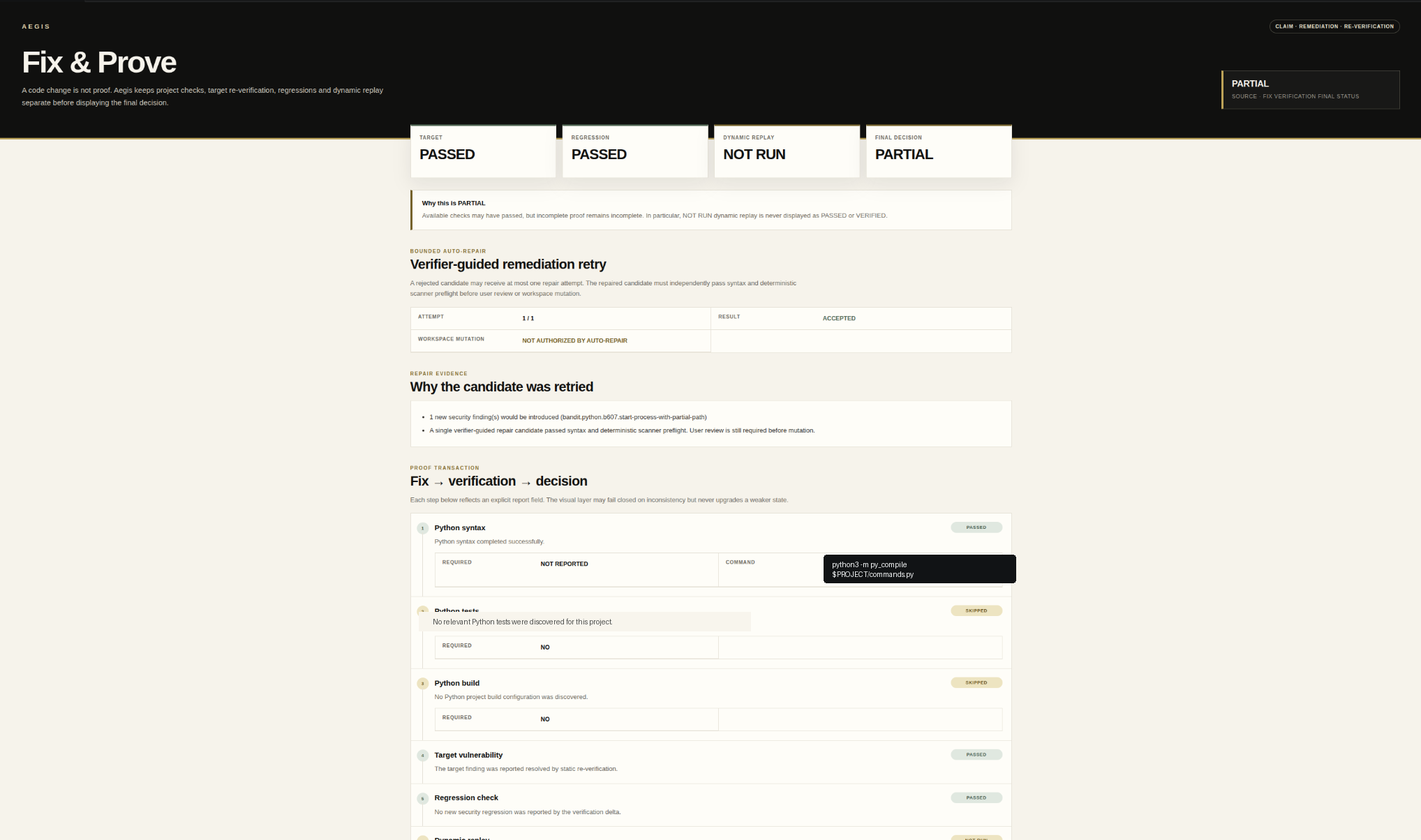
A generated patch is a proposal. Aegis keeps remediation review separate from the evidence required to trust what happens afterward.

Target re-verification, regression verification, dynamic replay, rollback state, and the final decision remain distinct. NOT RUN never becomes PASSED.
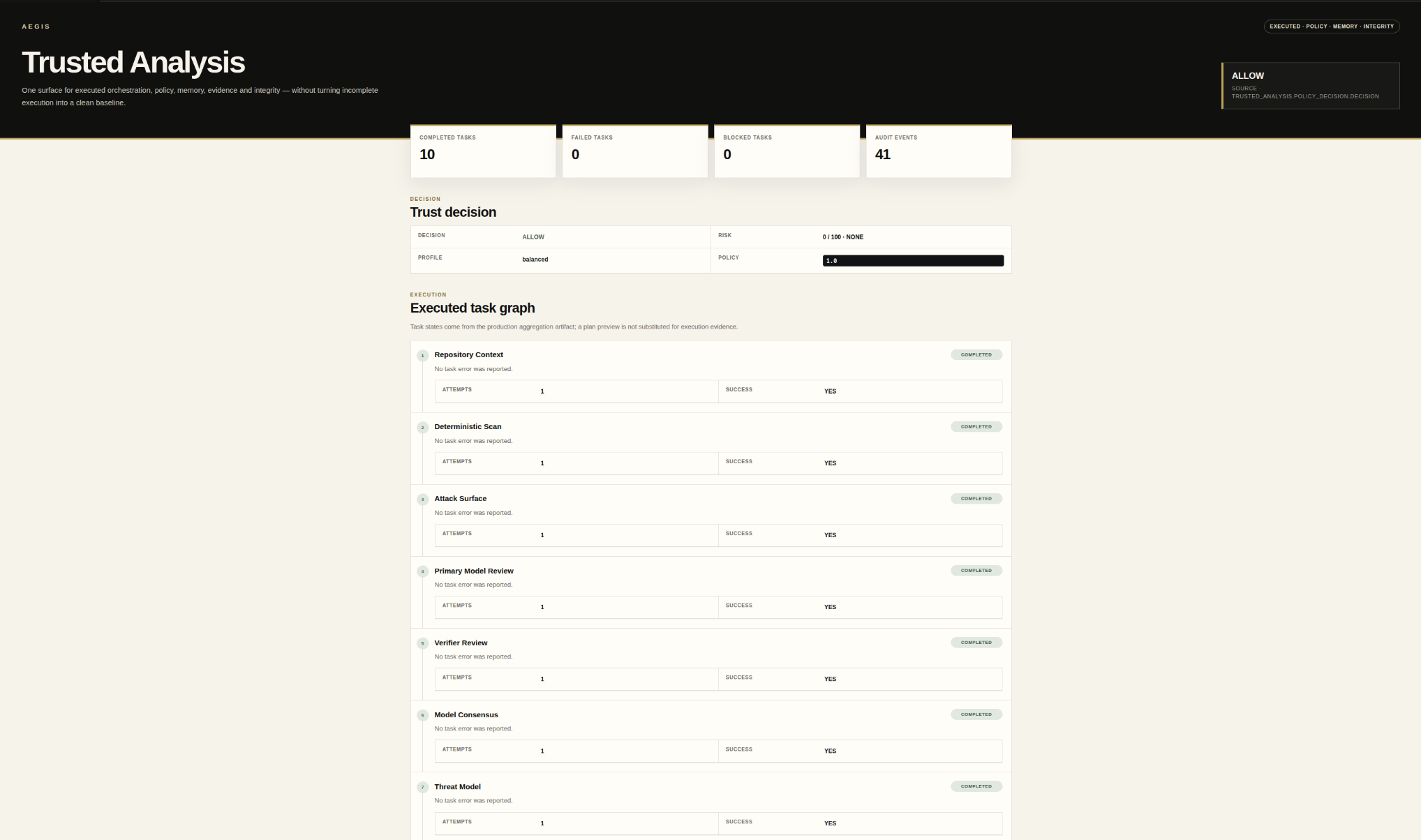
Trusted Analysis keeps executed tasks, policy, project state, audit evidence, and integrity visible without substituting planned work for executed proof.
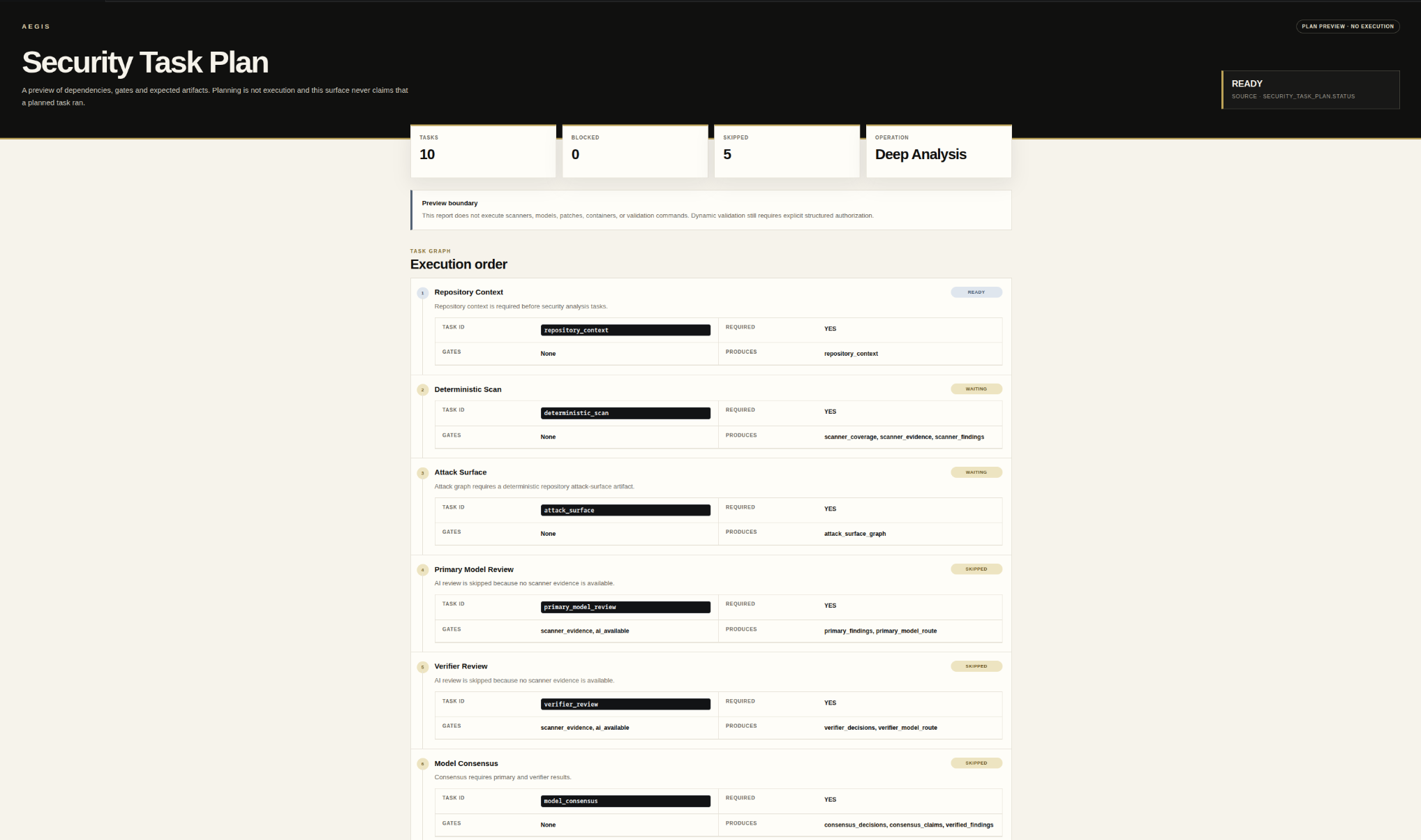
Security Task Plan exposes dependencies, gates, expected artifacts, and execution order without pretending that a plan has already run.
The Aegis moment
This is a condensed trace from the verified launch demo. The stronger conclusion is withheld when a required proof step did not run.
Target and regression checks passed. Dynamic replay did not run, so Aegis did not present the result as VERIFIED.
The system proposing the change does not get to become its sole certification authority.
Developer surfaces
VS Code, the signed managed runtime, and the public developer surface preserve the same separation between analysis, evidence, authorization, verification, and decision.
Review security findings, evidence, verification, policy, and remediation state inside the development loop.
Install Aegis → 02 / PUBLIC SURFACEUse the public repository for documentation, signed runtime releases, integration contracts, security guidance, and developer-facing artifacts.
Open GitHub → 03 / SIGNED RUNTIMEThe extension provisions the signed managed runtime on supported x64 platforms and verifies release metadata before readiness.
Runtime details →Built for trust
Aegis separates analysis from permission, a proposed fix from post-change verification, and a billing redirect from actual paid authorization.
Security at Aegis →Supported deterministic analysis, evidence, policy, and security state can remain on the developer machine by default.
Security-sensitive execution and mutation are treated as separate capabilities rather than implied by analysis.
A proposed result is not trusted merely because the component that created it says it is correct.
Founding Pro authorization comes from signed, server-side billing state rather than a client-controlled success screen.
Today and direction
The product and the long-term thesis are related, but they are not presented as the same thing.
Aegis gives developers an inspectable path from security claim and evidence through authorized validation, remediation, and independent verification.
As software takes more actions on its own, Aegis is being built toward the same core questions at a wider scope: what happened, was it authorized, what proves the result, and should it be trusted?
Start here
Use Community to get into the product. Use Founding Pro when you want the paid verification and remediation path.
Pricing
Start with Community. Founding Pro is $19/month. Team is $49 per active contributor with direct setup, and Enterprise is scoped with the organization.
For individual developers using the local-first Aegis workflow.
For professional developers who want the shipped paid verification and remediation capabilities.
For engineering teams that want Aegis across a shared development workflow. Team is $49 per active contributor, with setup handled directly by Aegis at launch.
For organizations evaluating private deployment, governance, and deeper security integrations.
AEGIS
Install Aegis, open a project, and inspect the evidence yourself.